FEATURES
Everything Yaoumy does for your daycare, feature by feature
Attendance, daily reports, private photos, secure pickup, menus, payments, re-enrollment: here is every Yaoumy feature, how it actually works, and what it replaces in your daycare.
- 14 features explained, no jargon
- Web for the administration, an app for educators and parents
- Designed and hosted in Algeria
On this page
Daycare attendance tracking
The educator checks each child in and out with one tap, right from her phone.
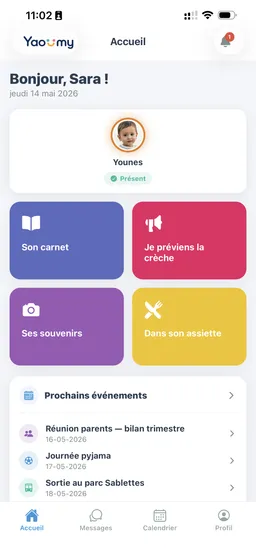
No more logbook copied out in the evening. Every arrival is logged with a timestamp, and so is every departure. Parents see their child's status live on their phone: expected, present, or absent, with the arrival time.
The app shows how many children in the class still need to be checked in. The administration gets the day's overview, attendance statistics, and a CSV export with reasons for absence.
- Arrival and departure in one tap, timestamped.
- Counter of children still not checked in per class.
- Child's status visible live to the parent.
- Attendance statistics by class and by period.
- CSV export of attendance with reasons for absence.
Replaces: The attendance logbook copied by hand.
Daily report sent to parents
The educator fills in mood, appetite, nap, and participation, adds a note, then moves on to the next child.
The report is filled in with swipes, child after child, without leaving the screen. Absent children are automatically removed from the day's list.
Parents receive the report the same day and no longer need to call to find out if their child ate or slept. The administration can review every report by date and by child.
- Mood, appetite, nap, and participation.
- Free-text note for a personal comment.
- Save-and-next flow from one child to the other.
- Absent children excluded from the day's list.
- Report history available to the administration.
Replaces: The home-school notebook and the "did he eat well?" phone calls.
Private daycare photos and videos
Every post is addressed to one child, several children, a class, or the whole daycare: only the parents concerned can see it.
A photo posted to a WhatsApp group or a Facebook page is out of the daycare's control. In Yaoumy, it stays inside the app, behind links that expire, and only reaches the families it targets.
Photo and social-media consents are logged on the child's record. If a child without consent is added to a post, the app warns the educator before it is sent.
- Targeting by child, by several children, by class, or by daycare.
- Photos and videos up to 90 seconds long.
- Photo and social-media consents tracked on the record.
- Alert before publishing when a consent is missing.
- Private gallery on the parent side, with photo saving.
Replaces: Children's photos on WhatsApp, Facebook, or Instagram.
Secure pickup: who collects the child
At pickup time, the educator chooses who is collecting the child and can capture a signature on the phone screen.
The child's record lists authorized people, with their relationship to the child and an ID document. The educator selects the parent, an authorized person, or a named third party, and the departure is timestamped.
For a last-minute change, the parent sends an authorization from their phone, with the person's name and a photo of their ID. The daycare finds it among the day's authorized people.
- Authorized people saved on the child's record.
- ID document required for a one-off authorization.
- Signature on screen at the moment of departure.
- Departure timestamped and kept in the history.
- "Authorized people today" view on the daycare side.
Replaces: Pickup authorization given by word of mouth or over the phone.
Parent requests: absence, pickup, appointments
Parents notify the daycare from the app; the request lands in an inbox that the daycare validates.
Four request types cover most of the day's phone calls: absence (one day or a period, with a reason and return date), "I'm on my way" when a parent is coming to pick up their child, pickup authorization for someone else, and appointment requests.
The educator sees requests from her own classes, the administration sees all the rest. Every request keeps its status and stays in a filterable history.
- Absence for one day or a period, cancellable by the parent.
- "I'm on my way": the pickup time is announced, the child is ready.
- Pickup authorization with an ID document.
- Appointment request with the administration.
- Inbox, validation, and history.
Replaces: Morning phone calls and messages lost in WhatsApp.
Messaging and announcements, no personal phone numbers
Parents, educators, and the administration talk inside the app: nobody needs to share a personal phone number.
The educator writes to the parent and can attach a photo or video. Once she no longer follows the child, the conversation closes on its own and stays viewable only.
Announcements go out to the whole daycare or to a single class, from reusable templates such as a closure notice or a payment reminder. The administration can restrict the educator to preset announcements.
- Private conversations between parents, educators, and the administration.
- Photos, videos, and documents as attachments.
- Reusable announcement templates and preset messages.
- Announcements targeted to a class or chosen children.
- The educator's personal phone number is never exposed.
Replaces: WhatsApp groups with personal phone numbers.
To cut down on calls and misunderstandings, read our guide Parent Communication.
Learning activities and the daycare calendar
The administration builds the activity catalog, the educator checks off the day's activities, and parents see them that same evening.
Drawing, songs, Quran, sport: each activity has its own icon and target classes. Parents finally know what their child did all day.
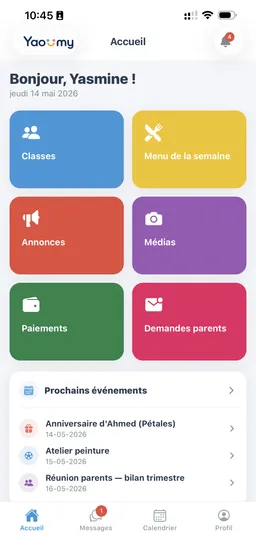
The calendar brings together outings, parties, theme days, parent meetings, closures, and birthdays. Parents respond to invitations and can leave a comment, and the daycare counts attendees before organizing.
- Activity catalog with icons and target classes.
- Day's activities recorded class by class.
- Typed events: outing, party, meeting, closure.
- Parent responses to each event, with a comment.
- Birthdays and closure days shown to everyone.
Replaces: The note pinned on the door and last-minute reminders.
Child records, allergies, and emergency contacts
Every child has a complete record: health, emergency contacts, authorized people, documents, and consents.
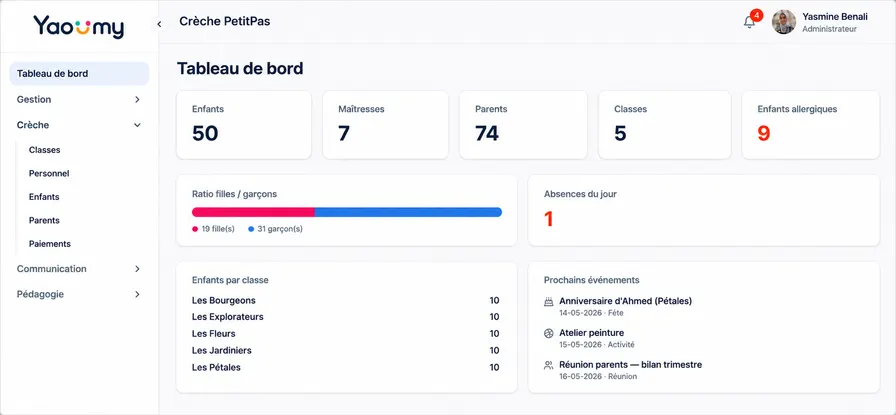
Allergies typed with their details, medical notes, emergency contacts, date and place of birth, photo: everything is in one place, viewable in the classroom as well as the office. Declared allergies surface as an alert on the dashboard.
When a child leaves the daycare, their file becomes read-only in the archive and can be reactivated if they come back. A file import avoids re-entering everything to get started.
- Allergies and medical notes, surfaced as an alert.
- Emergency contacts and people authorized to collect the child.
- Attached documents: ID photo, file records.
- Photo and social-media consents.
- Reversible archiving and import of the children's list.
Replaces: The binder of paper enrollment forms.
Daycare payments, reminders, and receipts
A family-by-month grid shows who has paid, who still owes, and lets you send reminders all at once.
Monthly fees, annual enrollment fees, and one-off charges such as an outing or a smock all sit in the same place, with a paid, unpaid, or overdue status and the remaining amount.
The daycare selects the late payers and sends a reminder to parents' phones, with a default or custom message. Parents can review their payments and receive their receipt by email.
- Family × month grid, statuses, and balance due.
- Annual enrollment fees and one-off charges.
- Grouped reminders sent to parents' phones.
- Payment receipt and statement of payments in PDF.
- Payment view on the parent side, covering several children.
Replaces: The payments notebook and reminders made from memory.
Online re-enrollment, signed by the parent
The daycare launches a re-enrollment campaign, the parent accepts or declines and signs with a finger on their phone.
The administration selects the children and next year's class, then sends the request. Each parent responds from the app, and an electronic signature is required to accept.
The tracking table shows responses as they come in. Once the campaign is closed, it joins a history where every signature stays available to view.
- Campaign sent to selected families, with a target class.
- "I'm re-enrolling" or "I'm not re-enrolling" response.
- Parent's electronic signature required to accept.
- Response tracking from the dashboard.
- History of campaigns and signatures.
Replaces: Re-enrollment forms handed out at the end of the year.
Expenses, suppliers, and the month's finances
Every expense is logged by category with its receipt, and the daycare sees its income-versus-expense balance for the month.
Kitchen, teaching supplies, maintenance: expenses are sorted by category, with the payment method and a photo or PDF of the receipt attached.
The supplier directory keeps everyone's contact details. The administration compares money in and money out without opening a spreadsheet.
- Expenses sorted by category, with the receipt attached.
- Payment method recorded for each expense.
- Daycare supplier directory.
- Balance of the month's income and expenses.
Replaces: The invoice binder and the Excel file.
Official daycare documents in PDF
Enrollment certificates, receipts, payment statements, and blank enrollment forms download as PDFs, headed with the daycare's letterhead.
A mother needs an enrollment certificate for her employer: it's ready in seconds, with the daycare's logo, stamp, and signature.
The blank enrollment form prints with its fields, the consents, and a spot for the parent's signature.
- Enrollment certificate with stamp and signature.
- Payment receipt, downloadable or sent by email.
- Statement of every payment recorded for a child.
- Blank enrollment form with consents.
- Custom letterhead: daycare logo and details.
Replaces: Certificates retyped by hand for every request.
Arabic, French, English, and data hosted in Algeria
Every user picks their own language, Arabic displays right-to-left, and data stays hosted in Algeria.
A mother reads the daily report in Arabic, the director works in French, a foreign family switches to English: nobody has to change apps.
Every daycare is siloed: its data is visible only to its own team and its own families. Photos travel through links that expire, and hosting is in Algeria, in line with Law 18-07.
- Native right-to-left Arabic, plus French and English.
- Language chosen by each user, not by the daycare.
- Strict data isolation between one daycare and another.
- Signed photo links that expire automatically.
- Servers in Algeria, Law 18-07 compliance.
Full details on security and data are on the Security and data page. Already running things with a notebook or a WhatsApp group? See the comparison of methods.
How to get started with Yaoumy
-
1
A 15-minute demo
We show you Yaoumy on a case close to yours, over WhatsApp or at your daycare. Ask your questions, no commitment.
-
2
Your daycare set up in under 24 hours
We create your classes, import your children's list from your file, and set up Saturday and your fees. You don't need to re-enter anything.
-
3
Educators and parents invited
Every educator and every family gets an invitation. The app is free for them, on iPhone and Android.
-
4
Guided through the first month
We stay reachable on WhatsApp through the whole first month, while attendance tracking and the daily report become part of the routine.
Questions about the features
Can we use only some of the features?
Yes. Every daycare starts with what it needs: you can turn on attendance, the daily report, and photos only, then add payments and re-enrollment later. Nothing forces you to switch everything on in the first week, and settings can be changed later with us.
Do parents see other children's photos?
No. Every post is addressed to one child, several children, a class, or the whole daycare, and a parent only sees what concerns their own child. Photo consents are logged on the record, and the educator is warned if one is missing before sending.
Does the educator have to give parents her phone number?
No. Exchanges go through the app's messaging, with no personal number involved. The administration can even restrict the educator to preset messages and announcements. When the educator no longer follows the child, the conversation closes automatically and stays viewable on both sides.
How does the educator fill in the daily report?
By swiping, on her phone. For each child: mood, appetite, nap, participation, then a free note if she wants to add something. She saves and moves straight to the next child. Absent children are removed from the list, so she only handles the ones who are there.
Does Yaoumy follow the Algerian week and Saturday?
Yes. The menu, calendar, attendance, and parent requests follow the Sunday-to-Thursday week. If your daycare opens on Saturday, you turn it on in the settings and Saturday becomes a working day everywhere in the app, including the weekly menu.
What happens to a child's data when they leave the daycare?
Their file is archived, not deleted. It becomes read-only, with its attendance, payments, and documents, and the daycare can reactivate it if the family comes back. Team member accounts are archived the same way, with a reason recorded.
See Yaoumy on your daycare
Fifteen minutes is enough for the full tour. We show you attendance, the daily report, and private photos on a case close to yours, over WhatsApp or at your place.
What parents see in the app
Daily report, private photos, absences, menu, and re-enrollment: discover Yaoumy from the family's side on the parents page.
Get the app