FOR PARENTS
Follow your child's day at daycare
Does your daycare use Yaoumy? The parent portal gives you daily news about your child: their arrival, daily report, photos, menu. And a way to notify the daycare without making a phone call.
- Free for parents: your daycare is the one that subscribes
- You only see your own child and their class
- In Arabic, French, or English, your choice
What you'll find in the app
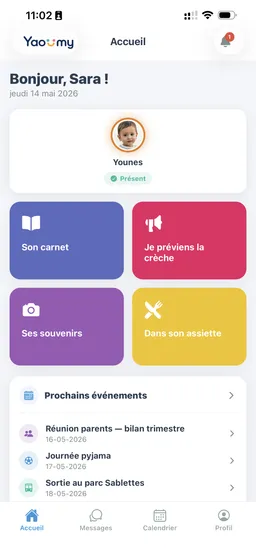
Know when your child has arrived at daycare
As soon as the educator checks them in, the app's home screen switches from “expected” to “present,” with the exact time.
No more calling to check. You open the app and see your child's status: expected, present with their arrival time, or absent. If you have several children, they're all on the same screen.
One glance in the morning is enough before heading to work.
- Three clear statuses: expected, present, absent
- Arrival time appears as soon as the educator checks them in
- All your children together on the same home screen
- Live updates, no need to refresh
Replaces: Morning phone calls to ask “did they arrive okay?”
The daily report: mood, meals, nap
Every day the educator fills in a report for your child — mood, appetite, nap, participation — and adds her own note.
You know if they ate well, if they slept, how the morning went. The educator's note adds the detail that matters: a new word, a small fall, real tiredness.
If your child was absent, the app tells you clearly instead of showing an empty screen.
- Mood, appetite, nap, and participation on one screen
- A note written by your child's own educator
- A “new report” badge on the home screen when it arrives
- Available to read in the evening, as many times as you like
Replaces: The home-school notebook left at the bottom of the bag
Their photos and videos, shared only with the parents concerned
The educator picks the children concerned before posting: you only receive photos of your own child or their class.
The day's memories arrive in a private gallery, inside the app. Only the families concerned and the daycare team have access — never a public link that anyone could open.
Files are kept for a limited time and carry an expiry date. Save to your phone the ones you want to keep.
- Targeting by child or by class, decided before sending
- Private gallery inside the app, no public link
- Photos and short videos, to zoom in on and save
- Your photo consent is recorded on your child's file
- Yaoumy never posts anything on social media
Replaces: Children's photos in a WhatsApp group or on a Facebook page
Full details on the security of your data and photos are on the Security and data page.
Looking for concrete rules to apply tomorrow? Our guide Children's Photos in Daycare covers written consent and how long to keep them.
On their plate: today's menu and allergies
The daycare prepares the week's menu, Sunday through Thursday; you can read it in the morning, before breakfast.
Morning snack, lunch, afternoon snack, and baby meals when it applies: you see what's served today and what was served in previous days. Handy for planning dinner without repeating the same dish.
Your child's allergies are recorded in their file and are flagged to the daycare when the menu is prepared.
- Morning snack, lunch, afternoon snack — and baby meals
- Algerian week: Sunday to Thursday, Saturday if the daycare opens
- History of past days' menus
- Allergies recorded on the child's file and flagged to the team
Replaces: The menu posted on the door, photographed on the way out
Today's activities and the daycare calendar
Activities done in class are shown every day, and upcoming events appear in a calendar where you RSVP.
Drawing, songs, Quran, sport: you know what your child did during the day. Something to talk about in the evening besides “was it good?”
Outing, party, theme day, parent meeting, closure: every event awaits your response. One tap is enough, with a comment if you have something to add.
- Today's activities, class by class
- Calendar of outings, parties, meetings, and closures
- One-tap RSVP, with an optional comment
- The class's birthdays announced ahead of time
- Daycare announcements gathered in one place
Replaces: The paper note slipped into the bag and last-minute reminders
Notify the daycare: absence, pickup, someone else picking up
A “notify the daycare” button gathers the four messages you send most often, without a phone call.
Declare an absence for today, tomorrow, or several days, with a reason and return date. You can cancel it if your child gets better. You can also signal that you're arriving in fifteen minutes.
If someone else is picking your child up, you authorize them from the app by attaching a photo of their ID. The educator knows who to expect and gets a signature at pickup.
- Absence: one day or a period, reason, return date, cancellable
- “I'm on my way”: give 15, 30, or 60 minutes notice before you pick up your child
- “Someone else is picking up”: name, relationship, ID document
- Appointment request with the administration
- History of your requests and their approval by the daycare
Replaces: Repeated phone calls and authorization given out loud at the door
Message the educator and the administration
A private messaging system connects each parent to their child's educator and to the administration, with no personal phone numbers exchanged.
A question about naptime, a medication to give, a delay to announce: you write in the app and the reply arrives in the same place. You can attach a photo or a short video.
Conversations stay available to read. When an educator no longer looks after your child, the exchange closes, but the history stays readable.
- Private conversation with your child's own educator
- Direct line to the administration for file questions
- Photos and short videos as attachments
- No phone number exchanged on either side
Replaces: The WhatsApp group where everyone reads everything
Track payments and receive receipts
Your child's record shows what's been paid, what's still owed, and the date of each payment.
Monthly fees, annual enrollment fees, one-off outing costs: everything is listed with its status. No more doubt about which month is already paid or how much is left.
The daycare sends you the payment receipt as a PDF by email, with its stamp and signature. It can also issue a statement of all your payments.
- Monthly status: paid, partial, unpaid, upcoming
- Amount paid, balance due, payment date
- PDF receipt sent by email by the daycare
- Summary statement of every payment
Replaces: The payments notebook and the handwritten receipt you eventually lose
Re-enroll your child and sign from your phone
When the daycare prepares for the new school year, it sends you the re-enrollment request: you respond and sign with your finger on the screen.
The request states the class proposed for next year. You accept or decline knowing the details, without going back to the daycare to fill in a form.
Your signature is recorded along with your answer. The administration tracks responses and knows who is coming back in the fall.
- Request received in the app, with the proposed class
- “I'm re-enrolling” or “I'm not re-enrolling” response
- Finger signature on screen, saved with your answer
- No trip or paper form to fill in
Replaces: The paper re-enrollment form to come sign on site
How it works
-
Your daycare invites you
The daycare creates your child's file and sends you an invitation by email. They open access; you don't have to ask for anything.
-
You download the app
Yaoumy is on the App Store and Google Play. The download is free, on iPhone as on Android.
-
You sign in
Open the invitation link, choose your password, then your language in your profile: Arabic, French, or English.
-
You follow every day
From the very first morning, you see your child's arrival, then their daily report, photos, and menu.
Questions from parents
Is Yaoumy free for parents?
Yes, the app is free for parents: it's your daycare that subscribes to Yaoumy. You download it from the App Store or Google Play, sign in with the invitation sent by the daycare, and pay nothing to follow your child.
My daycare doesn't use Yaoumy, what can I do?
Talk to the administration: they're the ones who open the daycare's account. You can also message us on WhatsApp at +213 554 992 993 or at contact@yaoumy.com with the daycare's name. We offer the director a 15-minute demo, no commitment.
Who sees my child's photos?
Only the parents linked to the child and the daycare team. When an educator posts a photo, she first chooses the class or children concerned: each family only receives what concerns them. Your photo consent is recorded on your child's file, and Yaoumy never posts anything on social media.
Is the app available in Arabic?
Yes. Yaoumy is available in Arabic, French, and English, and everyone chooses their own language in their profile: you can read in Arabic while the educator works in French. Arabic displays right-to-left, on phone as on computer.
I have several children, or two different daycares. Is that possible?
Yes, one account is enough. Your children at the same daycare appear side by side on the home screen. If a second daycare invites you, you switch between them from the app without creating another account, and a mid-year change of daycare is supported.
What happens to my data if my child leaves the daycare?
The file becomes read-only: you keep access to the history and the daycare no longer adds anything to it. Photos and videos are only kept for a limited time, with an expiry date shown — save the ones you want to keep to your phone. Account deletion can be requested from the dedicated page.
Tell your daycare about Yaoumy
If your daycare doesn't use it yet, one message is enough to start the conversation. We present Yaoumy to the administration in 15 minutes, on site in Algiers or over WhatsApp, and they decide from there.
See all of Yaoumy's features
Want to know what the app changes on the daycare side? The features page details attendance, daily reports, menus, payments, and re-enrollment, for the administration as well as educators.
Get the app